Reports
Reports
What this is for — the reports the office used to keep by hand: the daily trip tracker, how many calls come in and what happens to them, and where the work comes from.
Where to find it
Left menu → Business → Reports. Three tabs: Daily trip tracker, Calls, and Referral sources. All follow the Sacramento / Fresno switch.
Daily trip tracker
Pick the month with the Month box at the top right.
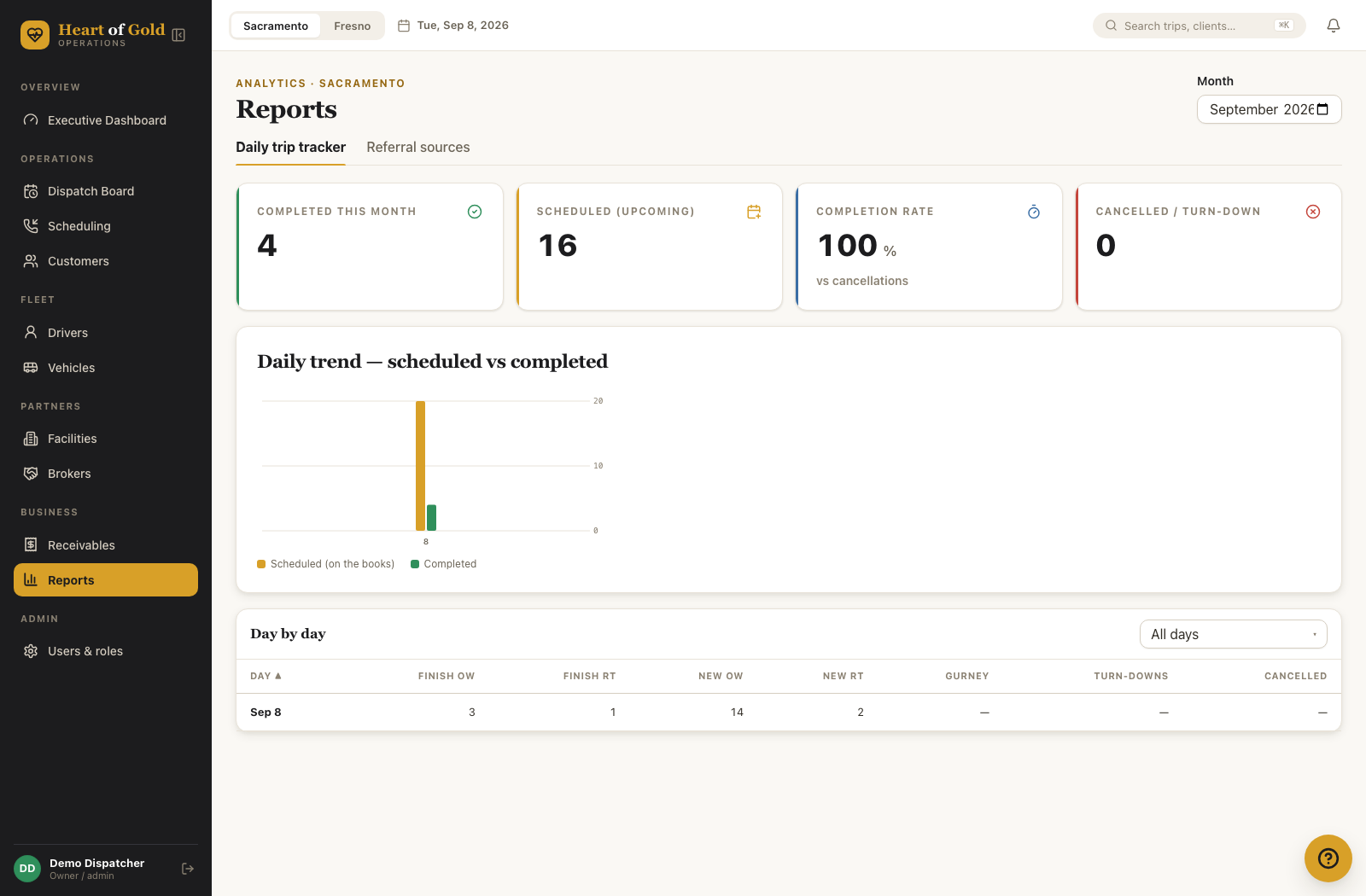
The four cards
- Completed this month — trips finished.
- Scheduled (upcoming) — trips still on the books for that month.
- Completion rate — completed trips as a share of completed plus cancelled.
- Cancelled / turn-down — the two added together.
The daily chart
Daily trend — scheduled vs completed, one pair of bars per day:
- Gold — on the schedule (completed plus still scheduled).
- Green — completed.
Hover a bar for the day and the count.
Day by day
| Column | What it counts |
|---|---|
| Day | The date |
| Finish OW | One-way trips completed |
| Finish RT | Round-trip legs completed |
| New OW | One-way orders taken that day |
| New RT | Round-trip orders taken that day (a round trip counts once) |
| Gurney | Completed gurney trips |
| Turn-downs | Work you had to refuse |
| Cancelled | Trips cancelled |
How "New" is counted. New OW and New RT are counted on the day the order was taken — the day the dispatcher booked it — whatever day the trip itself is on and whatever happened to it afterwards. A trip booked on Monday for next Wednesday counts on Monday; a trip booked and completed the same day still counts. A round trip is one New RT, not two. This matches the old paper tracker. (Finish, Gurney and Cancelled are counted on the day of the trip.)
Turn-downs come from two places: trips marked turn-down, and calls logged in the call log with the outcome Turn-down. Both are counted on their own date.
Filtering and sorting
- The dropdown above the table: All days, Only days with turn-downs, Only days with cancellations.
- Click any column heading to sort by it. Click again to flip the direction.
Calls
How many calls come in and what happens to them — a Phase 1 report that had never been built. The numbers here come only from calls actually logged — either through Log a call on the booking form, or a call that was booked straight through as a trip. A call nobody logged doesn't count.
Pick the month with the Month box at the top right — the same one the trip tracker uses.
The four cards
- Calls this month — every call logged, with the same month a year earlier for comparison underneath, when there's anything that far back to compare to.
- Booked — calls that turned into a trip.
- Turn-downs — calls you had to refuse.
- Still waiting on a callback — calls marked Pending or Needs info that haven't been resolved yet, whenever they were logged this month.
Day by day / week by week
A Day view / Week view switch above the table. Columns:
| Column | What it counts |
|---|---|
| Date | The day (or the Monday of the week, in week view) |
| Calls | Every call logged that day |
| Booked | Turned into a trip |
| Pending | Waiting on the client or the office |
| Needs info | Waiting on more details before it can be booked |
| Turn-downs | Refused |
| Facility / Broker / Private | Who was calling |
Click any column heading to sort by it. Click again to flip the direction.
By dispatcher
Name, Calls, Booked, Turn-downs, and Booked % for whoever took each call. A row named Not recorded means the call was logged before dispatcher tracking existed on the call log — there's no name to show for it, not a bug.
Referral sources
Where your work comes from, over time.
Steps — trips from one referral source over a period (e.g. the last 6 months)
- Left menu → Business → Reports.
- Click the Referral sources tab.
- Use the period dropdown at the top right and pick Last 3 months, Last 6 months, or Last 12 months.
- Find the source's row in the table at the bottom and read its total column — that is its trip count for the period you picked. (Use the Sort: most trips, Sort: busiest last month, or Sort: name A–Z dropdown next to the period one to find it faster.)
The period and sort pickers above are plain dropdown boxes, not buttons — see What the period and sort controls do below.
What the period and sort controls do
- Last 3 months / Last 6 months / Last 12 months.
- Sort: most trips / Sort: busiest last month / Sort: name A–Z.
What the three cards show
- Trips from referrals for the period.
- Top source — the biggest, with its share of volume.
- Active sources — how many are sending you trips at all.
What the table shows
Source, a small trend line across the period, the period total, and the share of all referral trips with a bar.
Good to know
- A source appears here once trips are booked against it. Sources come from the Refer by / source box on the booking form, plus facilities with Counts as a referral source ticked.
- If a booking leaves the source blank, the trip is credited to the broker, or to the pickup facility if there is no broker.
- Deleting a source from the booking dropdown does not remove it from this report — past trips keep the source they were booked with.
- The month picker will not go past the current month.
- Reports are open to Executive, Billing and Dispatcher accounts. Intake accounts cannot see this page.
- The Calls report only counts calls that were logged. A call that was booked without ever going through Log a call first still counts as a call — booking straight through logs it the same as logging one does.
If something looks wrong
- A day is missing from the table — no trips and no calls on that date, so there is no row. Check the filter dropdown too.
- Every dispatcher shows as "Not recorded" on the Calls tab — that's not a bug if you're looking at a month before dispatcher tracking was added to the call log; older calls simply have nobody attached.
- "New" numbers look wrong for the day you booked — see the note above: New is counted on the day the order was taken, not the day of the trip. Ten rides booked today for next week show as ten New today.
- The month looks empty — check the Sacramento / Fresno switch and the Month box.
- A source has no trips — nobody has booked against it in the period you picked. Try Last 12 months.
- A completed round trip looks like two trips — Finish RT counts legs, so each leg of a round trip counts there; New RT counts the order once.